
How We Automated Zoom Recording Storage with Zoho WorkDrive (It Was Harder Than It Sounds)
Introduction
The Problem:
Why Not Just Use a Native Integration?
The first thing most people do is look for a native integration or a pre-built automation. And fair enough tools like Zoho Flow, Make, or Zapier exist exactly for this purpose.
The short answer: a native Zoom-to-WorkDrive integration that handles the full workflow doesn't exist out of the box. Zoho Flow has connectors for both Zoom and WorkDrive, but when I tried to wire them together, I hit a hard wall. Zoho Flow's file handling has a 5MB limit on data processed through its custom functions. A typical 30-minute client call recording can be 200–300MB. The integration would run, appear successful, and produce a broken file on the other end.
This is the kind of thing you only discover after you've built the integration and tested it with real data. And it's a good reminder that "integration exists" and "integration works for your use case" are two very different things.
The Architecture
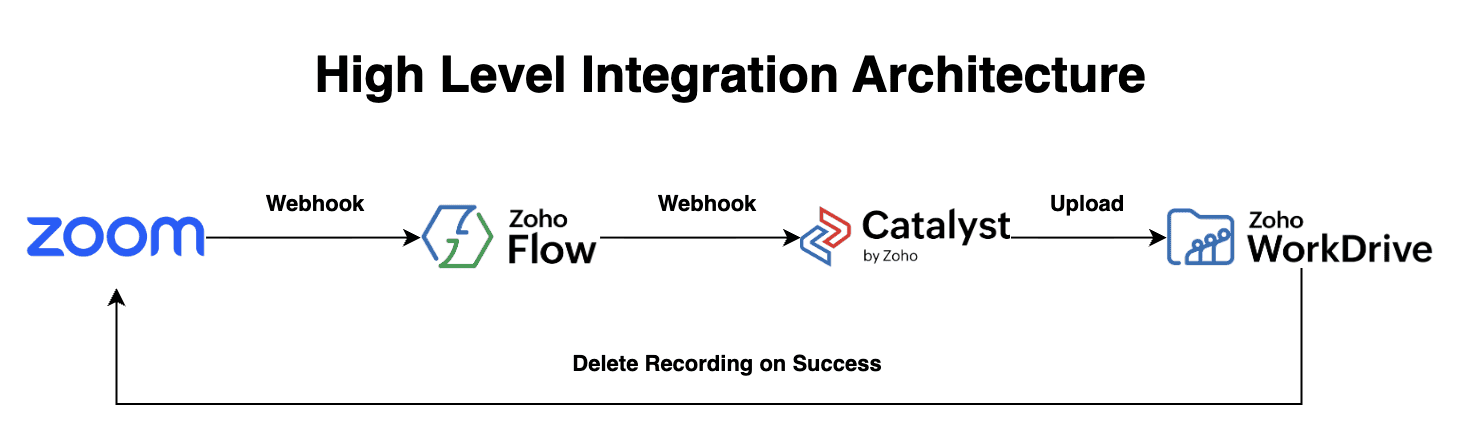
The High Level Flow
The Detailed Flow
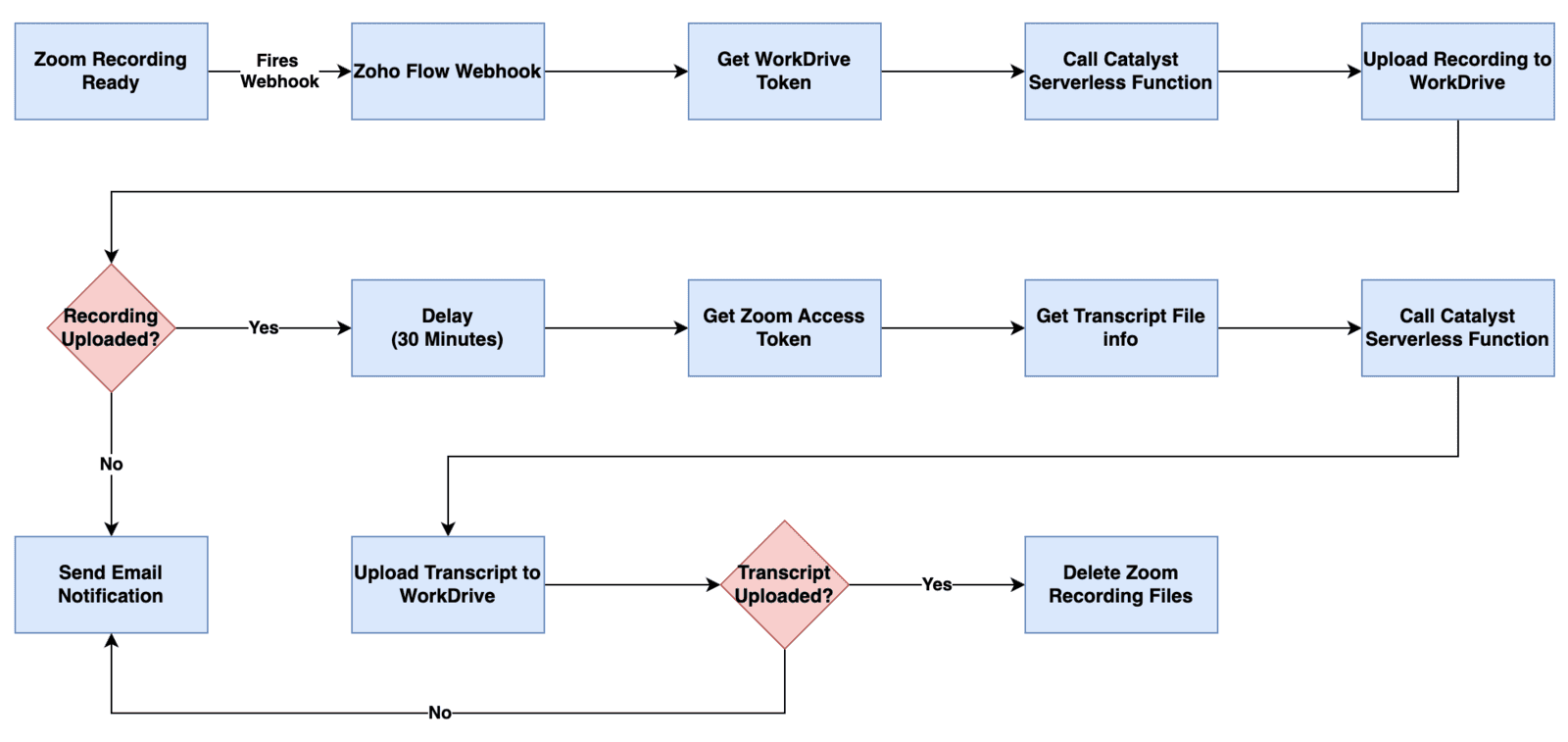
Zoho Flow: Acts as the orchestrator. It receives the webhook, manages the token exchange, controls the timing, and decides what happens based on success or failure at each step.
Zoho Catalyst: This is the piece most people wouldn't think to add. Catalyst is Zoho's serverless cloud computing platform. Because Zoho Flow can't handle large binary files, I offloaded the actual file work to a Node.js function running in Catalyst. The key advantage: it streams the video directly from Zoom's servers to WorkDrive's servers the file never needs to be fully loaded into memory. A 300MB recording and a 5MB recording go through the same process with the same reliability.
30-Minute Delay: Zoom generates the video recording and the transcript separately, and on different timelines. Moreover, the transcript file information is not included in the original webhook that trigger this process. The recording is usually ready within minutes of the call ending. The transcript takes a bit longer. If you try to grab the transcript immediately, it won't be there yet. The 30-minute delay is intentional after that window, the transcript is consistently available via Zoom's API regardless of call length.
Safety Gate Before Delete: Before anything is deleted from Zoom cloud, the system confirms that both the video file and the transcript were successfully stored in WorkDrive. If either upload fails, the recording stays in Zoom and an alert is sent. This is non-negotiable deleting before confirming means data loss with no recovery path.
The Lesson Learned
Without diving into too much technical details, here are some of the approaches we tested before we get our final bullet proof working architecture
Issue 1: File Size Limits in No-Code Tools
As I mentioned, Zoho Flow's built-in file handling has a 5MB ceiling. This isn't a bug, it's an architectural decision. Flow is designed for data orchestration, not file processing. For most automation use cases, this is fine. For video files, it's a dealbreaker.
Business lesson: When evaluating automation tools for media-heavy workflows, always test with real file sizes before committing to an architecture. A tool that works perfectly in testing with a short recording may fail completely in production with a full-length client call.
Issue 2: Transcripts Are Not Part of the Recording Webhook
Zoom's recording.completed webhook; the notification that fires when a recording is ready, does not reliably include the transcript file. Zoom treats the transcript as a separate output that gets processed on its own timeline.
This caught me off guard. I assumed that when Zoom said "recording completed," everything was done. In practice, "recording completed" means the video is ready. The transcript comes later, through a separate API call.
Issue 3: Tokens Expire
Zoom's download tokens — the credentials used to actually download a recording file — expire within 24 hours of the recording being created. By the time the transcript upload step runs (30+ minutes after the video upload), that original token is still valid. But if you tried to use it days later, it would fail silently.
This is why the system generates a fresh Zoom OAuth token specifically for the transcript download step, rather than reusing the one from the original webhook.
Issue 4: Serverless Functions Have Time Limits
Even after moving to Zoho Catalyst, I discovered that serverless functions have a 30-second maximum execution time. For short recordings, this isn't an issue. For a 45-minute client call that produces a 300MB file, the streaming process can exceed that limit on a slow connection. That's why you need to allocate at least 512 MB memory for the serverless function.
If you have longer than 2 hours meeting, the serverless function with its max memory allocation might fail. The solution is to migrate to Zoho Catalyst's AppSail environment; a container-based hosting option within the same Zoho ecosystem that has no timeout restriction. However AppSail cost is significantly higher. I've already set this up as a standby, ready to activate if the 30-second limit becomes a recurring problem at higher volumes.
Business lesson: Serverless functions are excellent for lightweight, fast operations. For anything involving large data or longer processing times, a persistent hosting environment is more appropriate. Both exist within Zoho's own platform, so this doesn't require switching tools; just using the right tool within the ecosystem.
What the End Result Looks Like
Once a Zoom call ends, the process runs completely automatically:
- The MP4 recording lands in the Zoom Recordings folder in WorkDrive, named with the meeting topic and timestamp
- The transcript lands in the Transcripts folder, same naming convention, as a readable text file
- The Zoom cloud recording is deleted once both files are confirmed
- If anything goes wrong at any step, I receive an email with the meeting details so I can handle it manually
The entire process takes about 30–35 minutes from call end to completion, with the majority of that time being the deliberate wait for the transcript to be ready.
Who Should Build Something Like This?
This automation makes the most sense for:
- Consulting firms and agencies that record client calls and need organized, searchable archives
- Sales teams that record discovery and demo calls and want recordings automatically tied to client records
- Customer success teams that review recorded sessions for QA or training
- Anyone on Zoho One who wants to maximize the value of tools they're already paying for
If you're paying for Zoom cloud storage and manually managing recordings, you're spending money and time on something that can be fully automated.
Our Next Step
This is not the final step in this project, The next step in this project is to feed the transcript into an AI agent that will read the transcript, generate the call summary and any action points from the call, and finally associate it with the respective meeting record in Zoho CRM. this is a WIP project.
Conclusion
This automation started as a 30-minute idea and became a several-week engineering project. That's not a complaint but a realistic picture of what business automation actually looks like when you care about reliability.
The final result works. Recordings are organized, transcripts are stored, Zoom storage stays clean, and nobody has to think about it. That's what good automation feels like when it's done right.
If you're running on Zoho and want to build something similar whether it's this exact workflow or a different automation that keeps hitting unexpected walls I'd be happy to take a look.
Schedule a free discovery call and let's see what's possible.